Sugargoo Spreadsheet
Browse seller listings by category, then compare buying new with picking up an item already stored in Sugargoo’s warehouse.
The search covers new marketplace listings from Taobao, Weidian and 1688. Relisted SUGARFLEA items are not in it; they sit on SUGARFLEA's own front page.
Shop by category
Open a category to compare new listings and check the original seller link.
 Team jerseysAsk for the crest and the back print in the photo set.Category
 Coats and jacketsPuffers weigh little but pack big, so check the box size.Category
 Bags and totesHardware and stitching show best in close photos.Category
 Sneakers and trainersShoe boxes add weight; dropping them is an add-on.Category
 Hooded sweatshirtsPrint placement is the thing to compare.Category
 TeesMeasure a tee you own before picking a size.Category
 DenimWaist and inseam figures beat letter sizes.Category
 Joggers and sweatsColors can shift between listing and QC photos.Category
 For womenA broad search; add your own words to narrow it.Search results
 Caps and hatsHat Caring Packaging is a paid add-on.Category
 BeltsCheck the buckle finish and the strap length.Category
 Sunglasses and framesAsk whether a hard case is included.Category
 FragranceAsk online support whether it can ship before paying.Category
 JewelrySmall pieces: ask for a photo beside a ruler.Category
 WatchesQC looks at the outside, not the movement.Category
 GadgetsFunction is not tested in QC, per the rules.Category
Why choose this Sugargoo Spreadsheet?
Official agent referral partners
Use our referral link to order on Sugargoo’s official site. Sugargoo handles checkout, warehouse QC and shipping.
Open Sugargoo30,000+ product finds
Explore our shared catalogue, compare wholesale listings and original seller prices, and view warehouse QC photos where available.
Browse the catalogueTrusted sellers with 10+ years
Our shortlist includes sellers with at least a decade in business. Check their store history and recent buyer feedback before ordering.
Community feedback
Use buyer photos, recent discussion and haul reviews to check how items look in real orders.
Find community resourcesAI virtual try-on
Preview supported pieces together on a model and see how a look comes together.
Try an outfitRegular events and flash deals
Check new offers and time-limited discounts. Confirm eligibility, stock and the end date on the offer page.
Check deals and updates
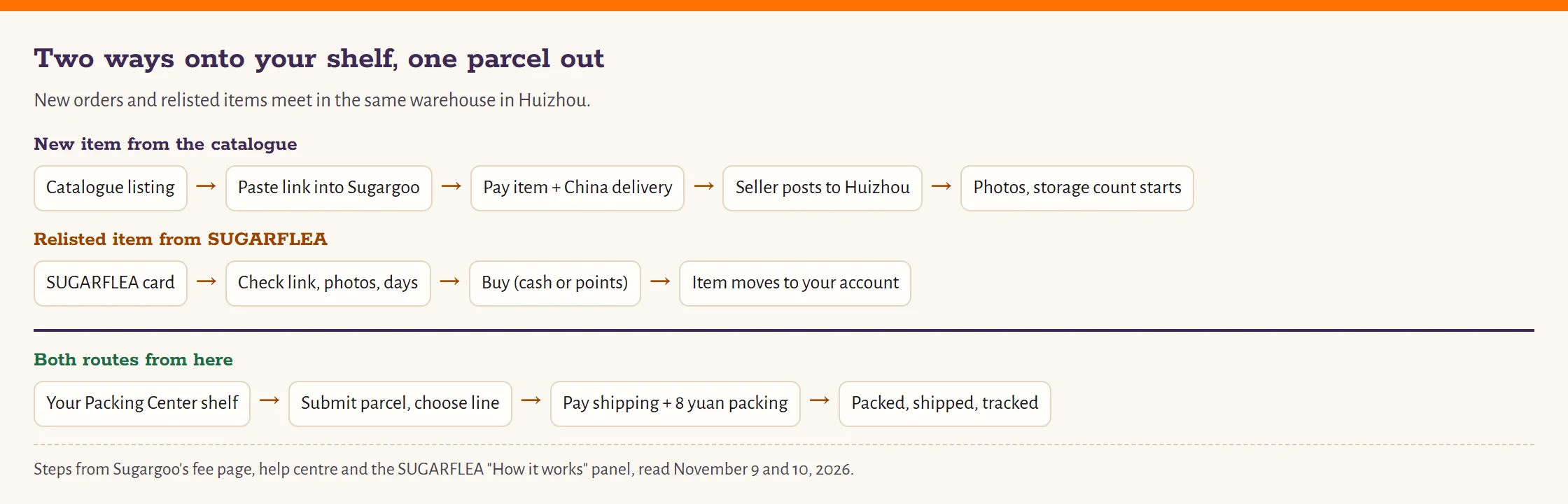
How to buy through Sugargoo
- Find a seller listing
Browse the categories and copy the link for the item and variant you want.
- Place a Sugargoo order
Paste the seller link into Sugargoo and confirm the item and domestic delivery cost.
- Review QC and plan shipping
Check the photos, then choose what to pack. For a relisted item, check the photos and remaining storage before purchase.
Sugargoo’s official ordering walkthrough
Watch how to check the item and submit an order. For SUGARFLEA purchases, follow the separate resale guide on this site.
See an AI outfit example
Fees, QC photos and help
Separate the purchase price from international shipping. For SUGARFLEA, check remaining storage before comparing the total.
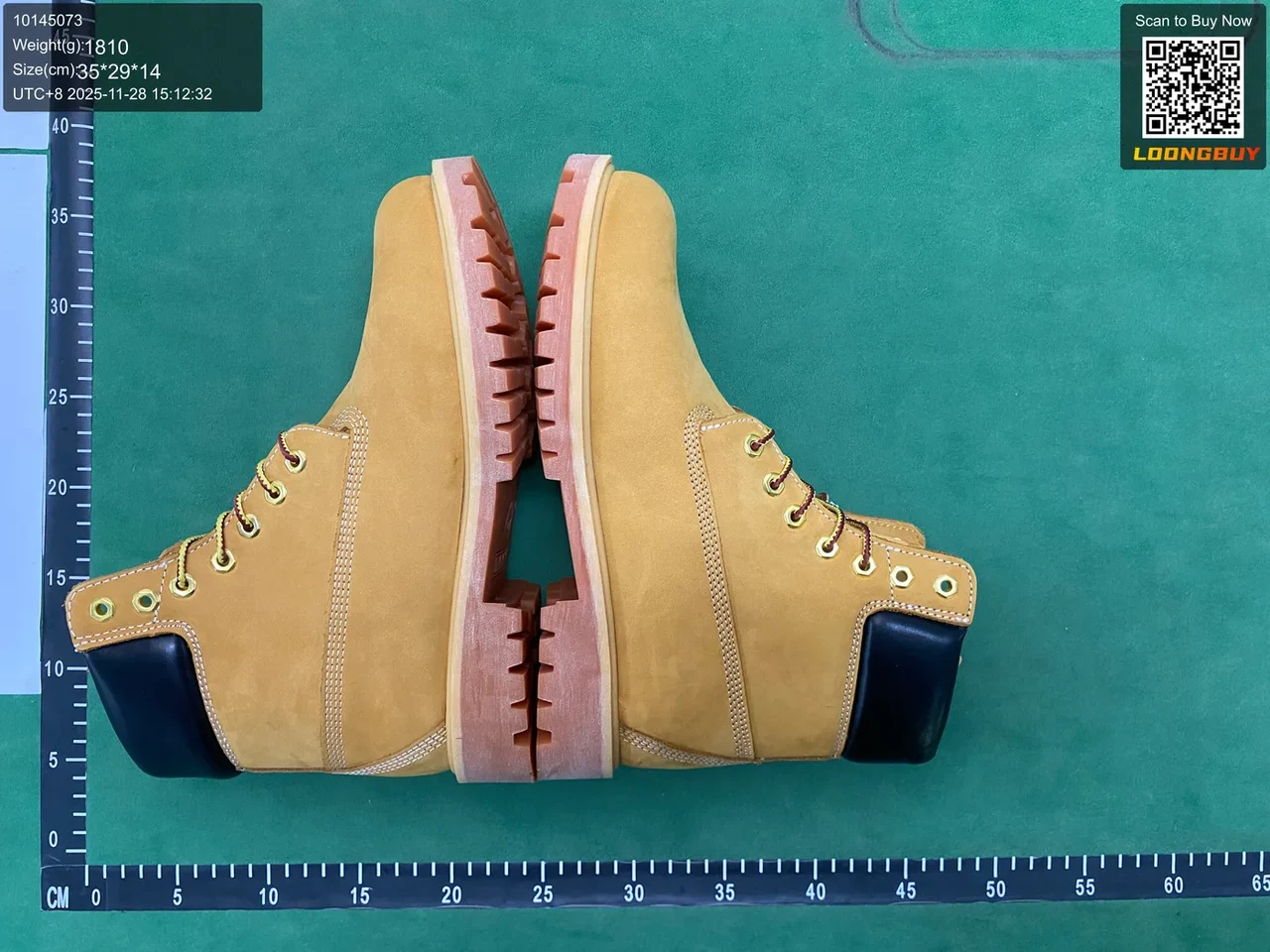
Look at the boot soles, edges and visible marks before deciding whether you need another angle.
The deal on this site
Bought once, stored, offered again
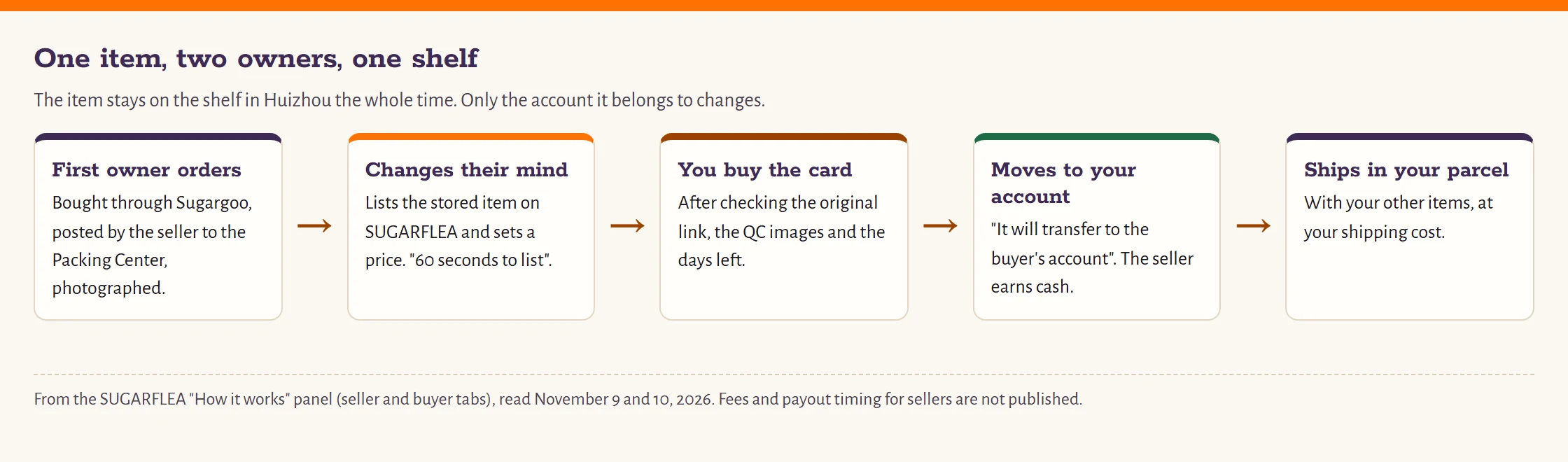
Every Sugargoo order passes through the Packing Center in Huizhou, Guangdong. Goods arrive from the seller, get checked and photographed, and wait there until their owner submits a parcel. Sometimes the owner changes their mind while the item is still sitting on the shelf. SUGARFLEA is Sugargoo's answer to that: the owner lists the stored item, sets a price, and another user can buy it.
The seller side of the official "How it works" panel (read November 10, 2026) promises "60 seconds to list your item" and says that once the item is purchased, "it will transfer to the buyer's account, and you will earn cash." In other words, nothing is posted from one person to the other. The item stays in Huizhou and changes account. You then ship it with your own parcel, at your own shipping cost.
That is the whole idea behind the word deals on this site. It is not a coupon, a countdown or a markdown we worked out. It is a second owner picking up something the first owner no longer wants, inside the same warehouse.
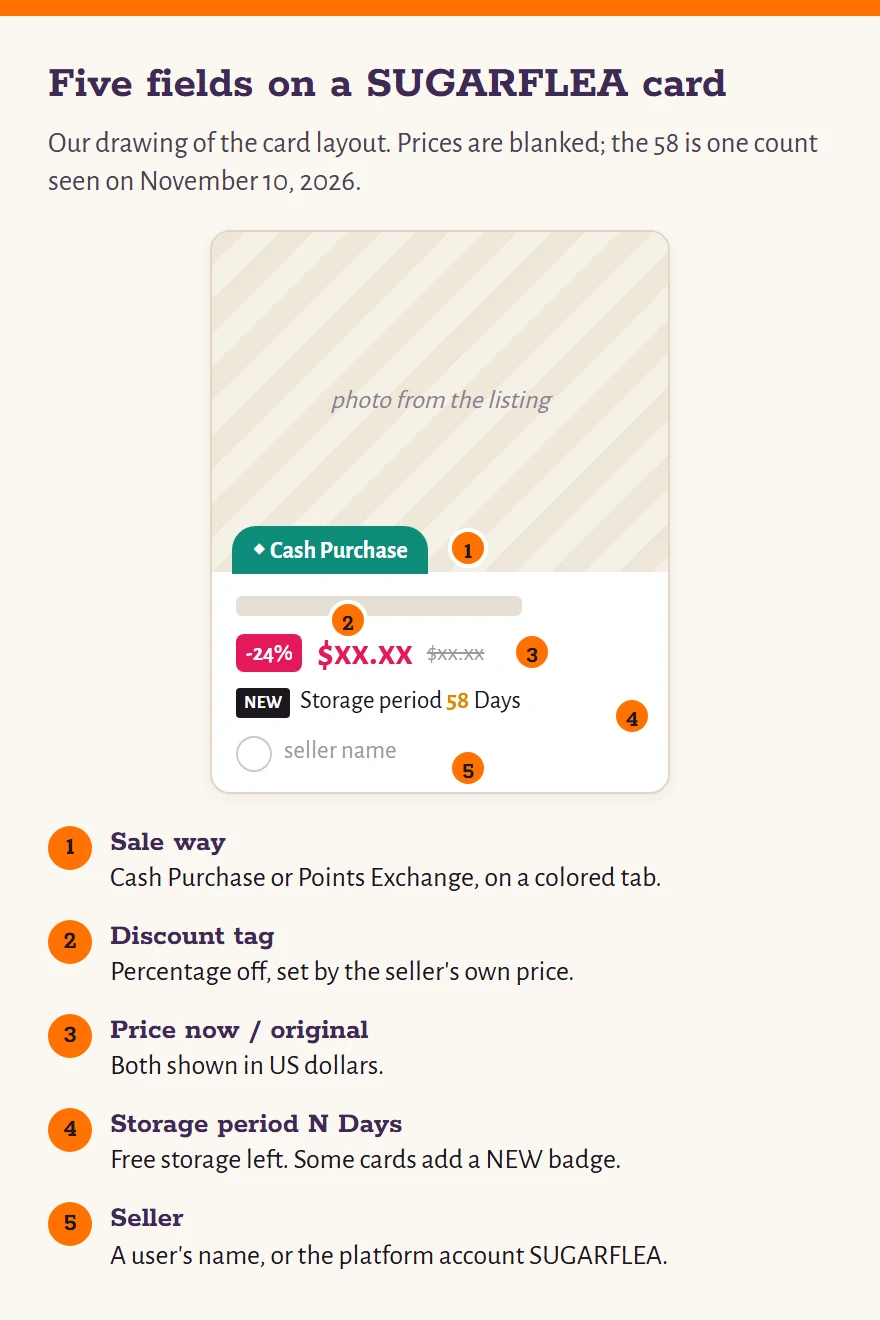
Five things printed on every SUGARFLEA card
A listing card on sugarflea.com is small, and every line on it does a job. Reading one from top to bottom:
- Sale way. Either "Cash Purchase" or "Points Exchange".
- Discount tag. A percentage off, set against the item's original price.
- Two prices in US dollars. What you pay now, and the struck-through original.
- Storage period. Printed as "Storage period N Days": the free storage the item has left.
- Seller. A user name, or the platform account called SUGARFLEA.
The fourth line is the one beginners skip, and the one that decides whether the item makes it into your next parcel. On the first screen we read on November 10, 2026, those counts ran from 19 to 111 days. A few were above 100, which is the standard free period, and the page does not explain why.
Our tool
Run one card through the numbers before you buy
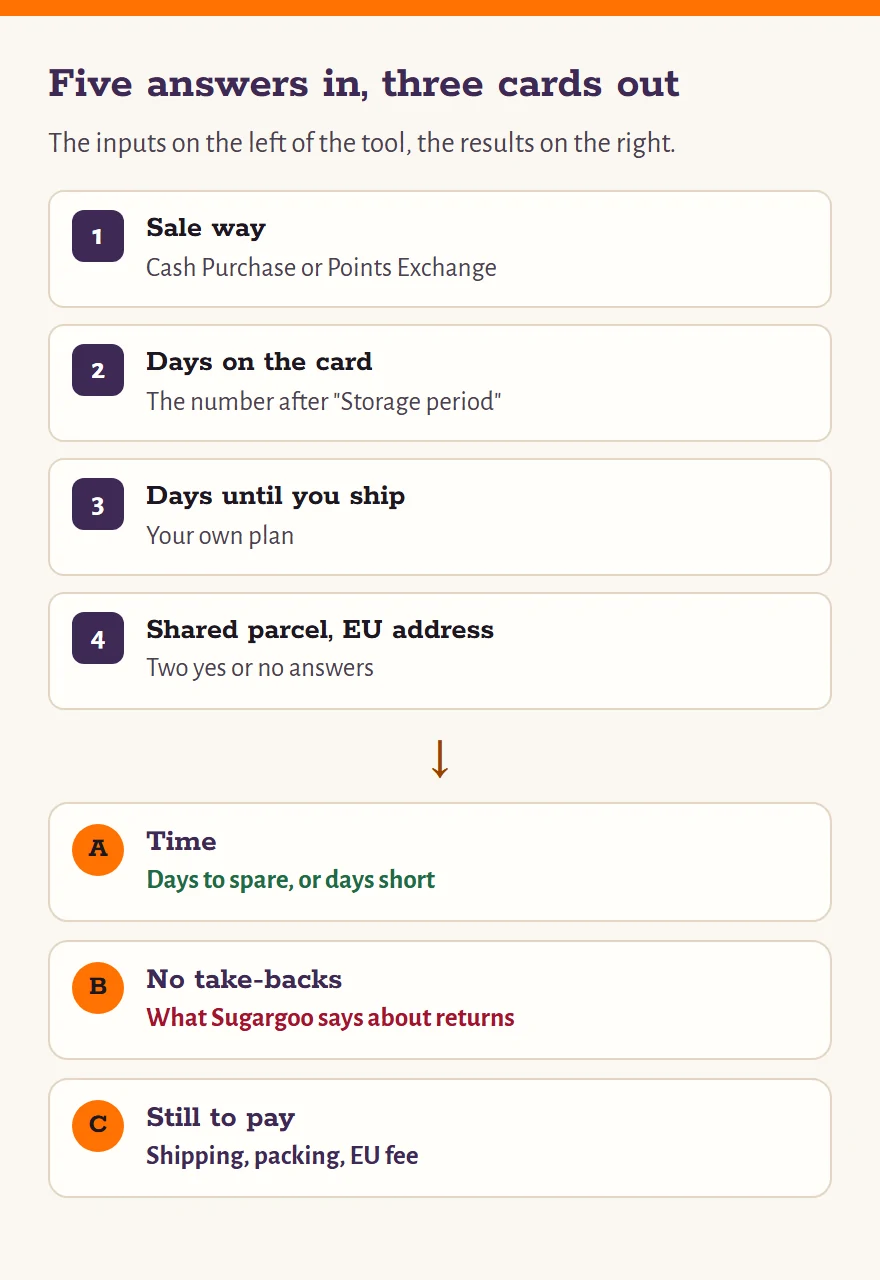
The Flea buy card takes five answers: how the item is sold, the storage days printed on its card, how many days from now you expect to submit your parcel, whether it will share a box with things you already have in the Packing Center, and whether the parcel is going to an EU country.
It gives back three short cards. Time tells you whether the days on the card cover your plan. No take-backs lists what Sugargoo has said, and not said, about returning a relisted item. Still to pay lists the costs that come after the item price.
It will not price anything, rate a discount or tell you an item is a bargain. Those calls stay with you.
A listing photo is someone else's best moment
Whether you are looking at a marketplace page or a SUGARFLEA card, the photos you see first are someone else's. On a marketplace they belong to the seller and show the best unit in the best light. On SUGARFLEA they are the warehouse photos taken when the item came in, which is better, but they still show a moment that has passed.
Our checklist starts with the size chart in centimeters, moves to the shop's own history, and ends with a short list of things not to buy through an agent at all.
Help, notices and community
Sugargoo's help centre holds 111 articles across 26 sections as of November 9, 2026, without separate addresses for each article. Our help page points you to the right section by name, explains the words you will meet on QC photos and order screens, and keeps short answers to the points frequently asked about relisted items.
Official notices that matter to a buyer, from the EU handling fee to the 2026 Black Friday points campaign on SUGARFLEA, are summarized with their dates on the notices page, along with Sugargoo's own community channels.
Help and glossary · Notices and community
Last updated November 10, 2026.